Create support tickets in Freshdesk
Updated July 14, 2023·
goldplatinumpluginsformspree-clifreshdesk
The create support ticket action adds support tickets in Freshdesk. Under the hood, this action calls the create ticket API endpoint.
Adding the create support ticket action in the formspree.json file has the same effect as adding the Freshdesk plugin in the Formspree dashboard. See the Freshdesk plugin help article for more information.
Get your API Token
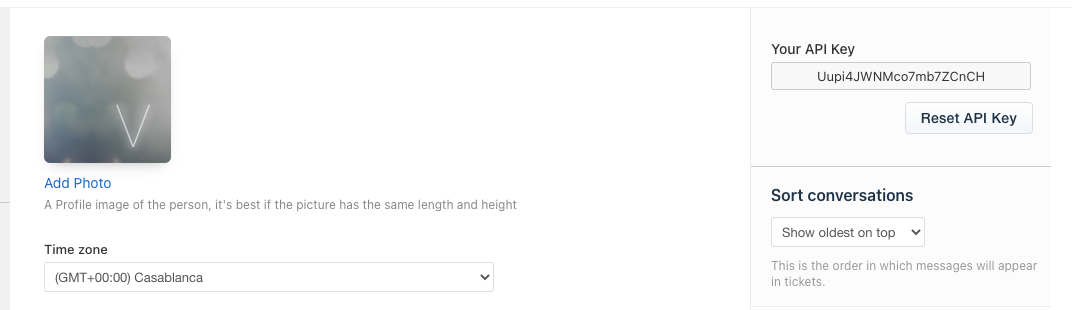
First go to your Freshdesk account and get your API Token.
This is available in Profile Settings page on the right side. Copy it, it will be needed in formspree.json configuration.
Formspree.json configuration
| Key | Type | Description |
|---|---|---|
app |
String | Must be freshdesk |
type |
String | Must be createSupportTicket |
apiKey |
String | Your API key (must be a $env variable reference, required) |
subdomain |
String | Your Freshdesk subdomain (without .freshdesk.com or https) |
Example
{
  "forms": {
    "support": {
      "name": "Support Form",
      "actions": [
        {
          "app": "freshdesk",
          "type": "createSupportTicket",
          "apiKey": "$FRESHDESK_APIKEY"
          "subdomain": "newaccount1612001078242"

        }
      ]
    }
  }
}
Validation rules
The create support ticket action adds the following submission validation rules implicitly:
| Field | Validation Rule |
|---|---|
email |
Required |
email |
Type is email |
message or msg |
Required |