# reCAPTCHA v3 を使用する

> Formspree Docs · フォームとプロジェクトの設定 · 2025年11月18日

フォームがスパムの送信手段として使われるのを防ぐため、Google [reCAPTCHA v3](https://www.google.com/recaptcha/about/) を導入しています。バージョン3は Google の最新の非表示型 reCAPTCHA テクノロジーです。ユーザーはチェックボックスをクリックしたりテストに合格したりする必要はありません。代わりにスクリプトがユーザーの閲覧行動を観察して、人間らしく見えるかどうかを確認します。

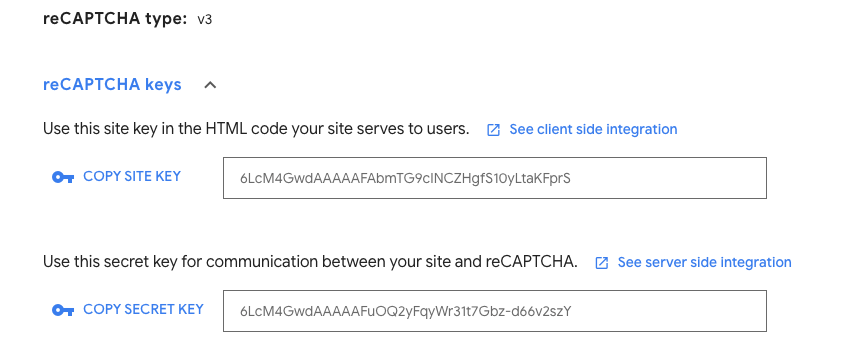
まず、[reCAPTCHA 管理コンソール](https://www.google.com/recaptcha/admin) にアクセスします。新しいキーを作成（または既存のキーを使用）し、v3 reCAPTCHA を選択します。ドメインを追加して **Submit** をクリックします。サイトキーとシークレットキーが表示されます。
![mceclip0.png](/images/zendesk/cdc797b7d39c75ee.png)

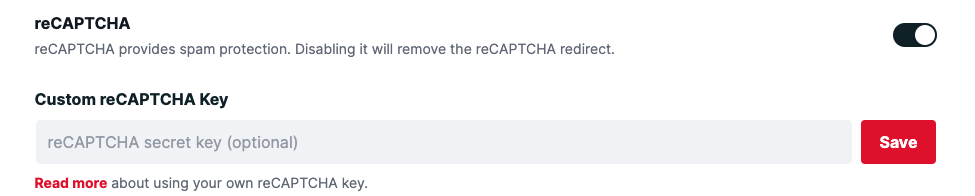
次に、Formspree フォームの設定タブにアクセスし、reCAPTCHA が有効になっていることを確認します。reCAPTCHA コンソールからシークレットキーをここに貼り付けます。
![mceclip1.png](/images/zendesk/59d2d6bea1825946.png)

最後のステップは、reCAPTCHA v3 の **site key** をあなたのサイトに追加することです。標準的なフォーム設定では、次のように追加できます。

```html
<html>

<head>
    <script src="https://www.google.com/recaptcha/api.js"></script>
    <script>
        function onSubmit() {
            document.getElementById("myForm").submit()
        }
    </script>
</head>

<body>
    <form id="myForm" action="https://formspree.io/f/{form_id}" method="POST">
        <input name="email" type="email">
        <button class="g-recaptcha" data-sitekey="reCAPTCHA_site_key"
            data-callback='onSubmit' data-action='submit'>Submit</button>
    </form>
</body>
</html>
```

別の方法を使いたい場合は、[Google reCAPTCHA v3 ドキュメント](https://developers.google.com/recaptcha/docs/v3)に reCAPTCHA のさまざまな実装方法が詳しく説明されています。独自のフィールドを使用する場合、フォームは `g-recaptcha-response`（フィールドのデフォルト名）という名前のフィールドを探しますので、別の名前に変更しないでください。

また、AJAX を使ってフォームを送信することもできます。以下の例で、jQuery を使用して reCAPTCHA v3 でフォームを送信する方法を確認してください。

```html
<html>
<head>
    <script src="https://ajax.googleapis.com/ajax/libs/jquery/3.5.1/jquery.min.js"></script>
    <script src="https://www.google.com/recaptcha/api.js?render={your-site-key}"></script>
</head>

<body>
    <button onclick="captcha()" class="btn btn-primary">click me</button>
    <script>
      function captcha() {
        grecaptcha.ready(function() {
          grecaptcha.execute('{your-site-key}', {action: 'submit'}).then(function(token) {
              $.ajax({
                url: "https://formspree.io/f/{your-form-id}",
                method: "POST",
                dataType: "json",
                data: {
                  email: "test@email.com",
                  message: "Hello world!",
                  "g-recaptcha-response": token
                },
                success: () => {
                  alert("Done!")
                },
                error: (err) => {
                  alert("Something wrong!", err)
                }
              });
          });
        });
      }
  </script>
<html>
```
