# Use Github to add issues to a repository
> Formspree Docs · Plugins · Updated February 28, 2026
#### Available on: Personal, Professional, Business plans
## Form Setup
Before using the GitHub Plugin, you must create a form to collect new submissions. Any HTML, CSS or JavaScript form will work. Additionally, you can use the following special named inputs to customize the repository issue.
### name="subject"
Adding an input named **"subject"** will add a title to the issue.
```html
```
### name="tags"
Adding an input named "**tags**" will mark the issue with **labels**. The label value must exist previously in your repository. By default, we add **formspree** tag to the new issues.
This is an optional field.
```html
```
## Connecting to GitHub
_Note: If you're using the [Formspree CLI](/articles/using-the-cli/the-formspree-cli/) please instead refer to our article [Add issues to a Github repository](https://help.formspree.io/hc/en-us/articles/15946595829011) to connect to GitHub._
Once you've created and configured a form, you can connect to GitHub using the GitHub Plugin. GitHub Plugin is only available on **Workflow**. To do so, first go to the Workflow tab of your form then click the GitHub Plugin button under Productivity section.

It will trigger a popup that will ask you to connect to your GitHub account.
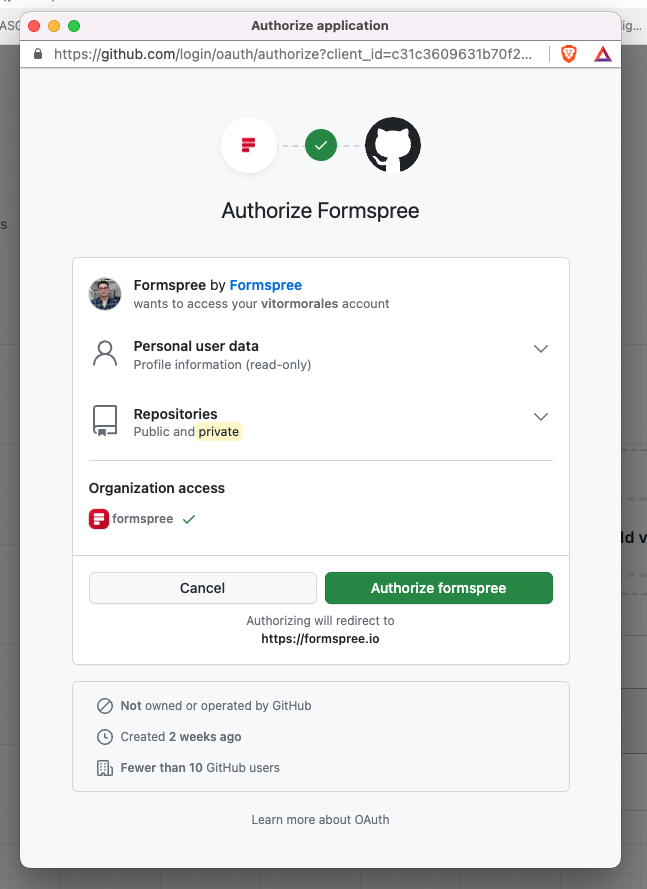
Once you've signed in, you'll be prompted to select the GitHub repository that will be linked under Finish GitHub Setup:
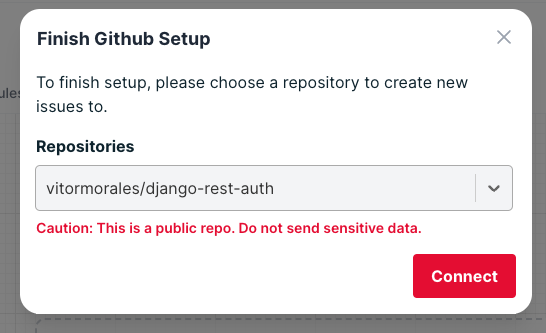
We recommend selecting private repositories or to not expose sensitive data if you connect to public repositories. If the selected repository is public, you will see the warning "**Caution: This is a public repo. Do not send sensitive data.**"
Once you've connected, you'll see the GitHub settings modal:
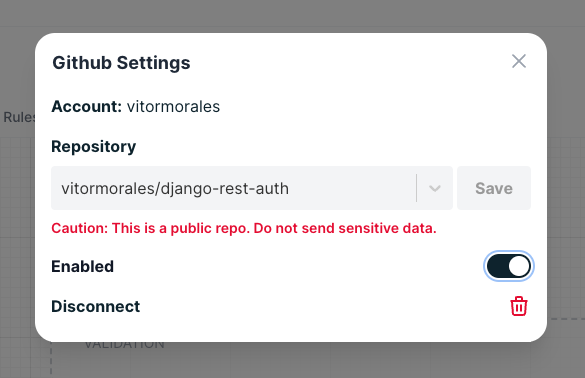
In the future, if you'd like to change the list or disable the plugin entirely, you can do so by clicking on the GitHub button again to adjust its settings.